Business Process Automation for Growing Businesses
Intelligent systems that move your business forward – automatically.
Book a Discovery Call
How Automation Improves Lead Management and Client Communication
It’s structured logic running through your entire operation – silent, relentless, and precise.
Data Populated Intelligently
Information moves between systems automatically, reducing manual entry and ensuring records stay accurate.
Actions Triggered Across Platforms
Events in one platform can trigger actions in others, allowing processes to move forward without manual intervention.
Clients Guided Through Journeys
Prospects and customers move through defined journeys that ensure consistent communication and follow-up.
Opportunities Moved Automatically
Pipeline stages can update based on activity and data, helping teams maintain an accurate view of opportunities.
Automation becomes part of the operational structure of the business,, ensuring systems work together and processes run consistently.
What automation actually does for a growing business.
A comprehensive toolkit designed to orchestrate every layer of your digital operation – from client-facing portals to back-end data logic.
1
Lead Follow-Up
very enquiry is followed up automatically at the right time, through the right channel, with the right message. Opportunities are never left waiting on someone remembering to act.
2
Client Onboarding
New clients move through a structured onboarding journey from the moment they commit, welcome communications, document collection, introductions and next steps, all handled automatically.
3
Pipeline Movement
Deals and opportunities progress through defined stages based on activity and data — keeping the pipeline accurate and ensuring nothing sits idle.
4
Task Assignment
The right people receive the right tasks at the right time, based on predefined rules. Work is distributed properly without manual coordination.
5
Reporting & Visibility
Dashboards and performance data update in real time as activity happens across the business, giving leadership an accurate picture without manual collation.
6
Cross-System Data Flow
Information moves between platforms automatically – CRM, operations, finance and reporting all working from the same data without manual re-entry.
7
Renewal & Retention
Clients approaching renewal, review points or natural follow-up moments are contacted automatically. Retention becomes a managed process rather than an afterthought.
8
Communication Sequences
Multi-step email, SMS and messaging sequences that guide prospects and clients through the journey, consistent, timely and personalised to where they are in the process.
How This Changes The Business
The System Drives Movement
When automation is implemented properly, work moves through the business without constant manual intervention.
Processes continue running even when people are busy, ensuring tasks are completed, information moves between systems and opportunities keep progressing.
Work Moves Automatically
Processes no longer depend on someone remembering the next step. Workflows trigger actions, reminders and updates automatically.
Information Flows Between Systems
Data moves between platforms without manual entry, keeping systems accurate and reducing duplication.
Teams Stay Informed
Notifications, updates and task assignments ensure the right people know what needs attention and when.
Opportunities Keep Progressing
Automation ensures leads, clients and projects continue moving through the appropriate stages of the journey.
The Difference
Many businesses use automation to solve individual problems as they appear. At Nexus 360, automation is designed as part of the operational system from the beginning. It supports how the business runs day to day, rather than acting as a series of disconnected fixes..
Supports Structure
Automation helps ensure processes run consistently across teams, departments and client journeys.
Supports Revenue
Follow-up, upsell opportunities and renewal reminders can be triggered automatically, ensuring opportunities are managed consistently.
Supports Visibility
Automated updates and reporting give leadership a clear and accurate view of activity across the business.
What Good Looks Like
Automation becomes part of the operational structure of the business. Systems communicate with each other, processes move forward automatically, and information updates across the organisation without manual effort. The result is an operation that runs more smoothly and scales more easily.

Self-Managing Portals
Client portals handle onboarding, document exchange and status updates automatically, reducing the need for manual coordination.

Progressive Sales Ladders
Automated offer sequences move prospects through increasing levels of engagement and value over time.
Real-Time Data Updates
CRM records, pipeline stages and reporting update automatically as activity occurs across the system.

Structured Member Journeys
Members move through clearly designed pathways — from onboarding through ongoing engagement and renewal.
How It Connects
Automation doesn’t operate on its own. It runs through your CRM, connects with your operational systems, supports ERP where appropriate, and helps manage digital engagement across the client journey. Where GoHighLevel is the platform of choice, Nexus 360 builds advanced GHL automation and custom integrations — including AI-powered intent analysis, 3rd party connections, and a custom control layer that extends GHL beyond what it can do natively.
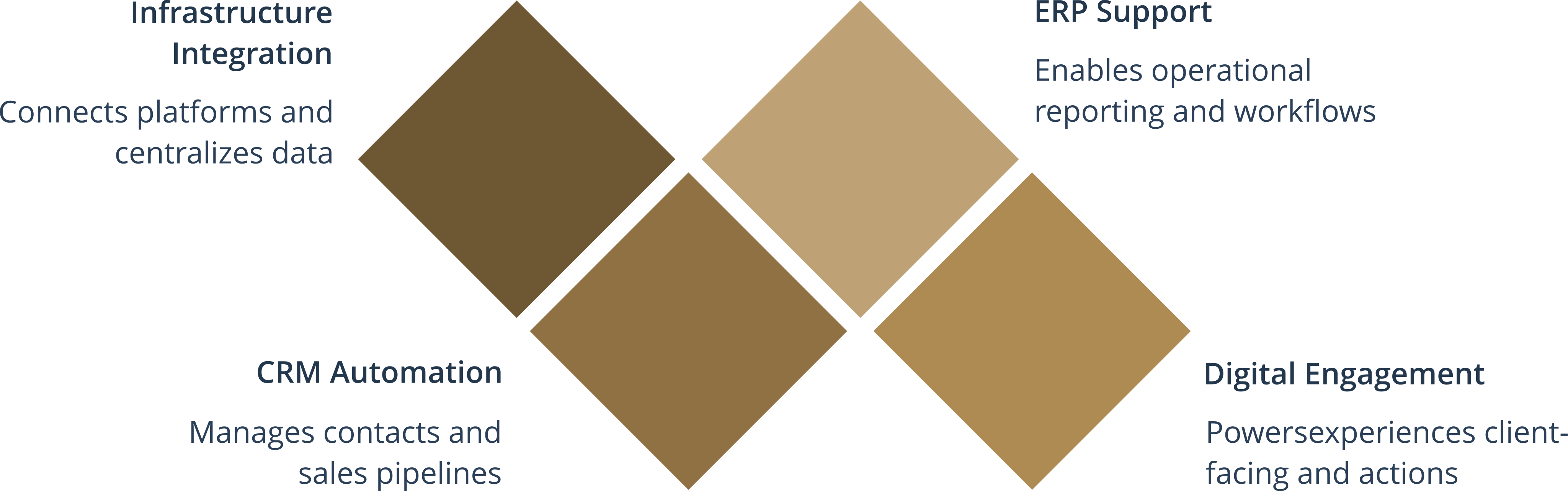
Automation is what turns system design into day-to-day action.
Automation Should Be Designed – Not Improvised
Every workflow, trigger and integration should exist for a clear reason, connected to the business outcome it supports, not added because it seemed like a good idea at the time.
Book a Discovery Call Download the Free Growth Guide